
How to resolve inconsistent license authorization between dual management nodes?
ZSvirt was open-sourced from the ZStack ZSphere commercial project and has since developed independently. Some code, configuration, and documentation still retain historical ZStack/ZSphere names (such as environment variables, configuration items, dependencies, paths, and commands). These names are for compatibility only and do not affect the normal use of ZSvirt.
Symptom
The virtualization platform UI displays a warning indicating inconsistent license authorization between the two management nodes.
Cause
The license authorization was applied incorrectly.
Solution
-
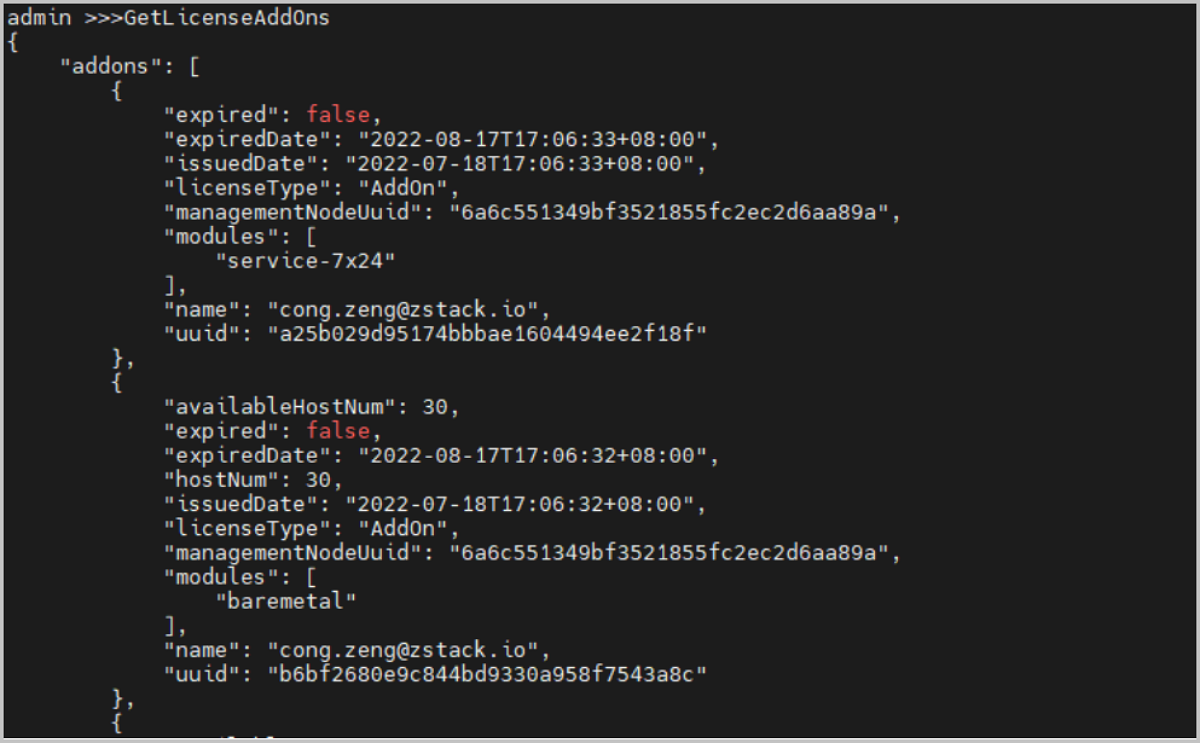
Log in to the Management Node and run the following commands in sequence to query the license add-on modules on both management nodes:
[root@localhost ~]# zstack-cli
admin >>> LogInByAccount accountName=admin password=$password  //password is the platform admin user password
admin >>> GetLicenseAddOns
See Figure 1 for an example:
-
Run the following command to delete the inconsistent license module:
admin >>> DeleteLicense managementNodeUuid=$ Uuid=$Before deleting a license module, confirm that it is a duplicate between the two management nodes. Accidentally deleting a license module may affect normal operation of the virtualization platform.