Image StorageImage Cross-Platform Usage
Export VM as OVA Template
Export a virtual machine in the .ova file format to a standalone image storage within the same data center. The exported OVA template does not include ISO drives or GPU devices.
Before exporting an OVA template, ensure that the virtual machine is powered off.
-
In the navigation pane, choose Inventory > Host and VM.
-
Right-click the target virtual machine, then select Template > Export OVA Template.
-
In the Export OVA Template dialog, choose the export method and image storage, and then click OK.
- For large VM files, it is recommended to select export only. After exporting, you can go to the export list page to view and download.
- For medium and small VM files, you can directly choose to export and download.
-
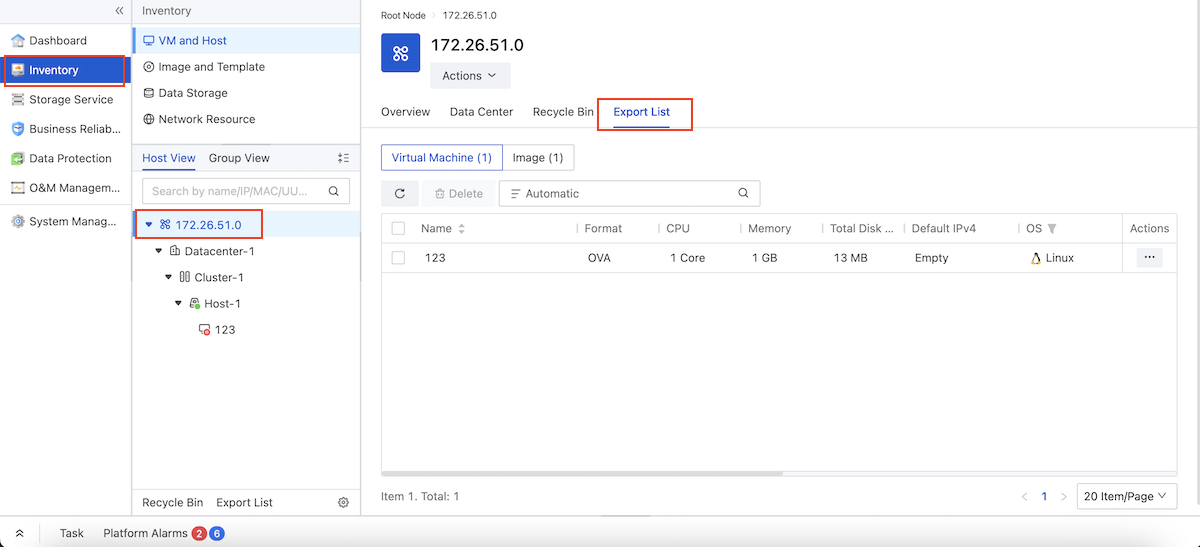
After the export completes, click Inventory > Root Node.
-
Click Export List to view the exported VM OVA template.